How to automate subcontractor document requests and reminders
By Sergio Jardim · 8 September 2026
Learn how to automate subcontractor document requests, expiry reminders and follow-ups without sending unnecessary emails.
Most subcontractor document chasing is predictable.
A document is missing.
You send a request.
Nothing happens.
You follow up.
A certificate approaches expiry.
You send another request.
Nothing happens.
You follow up again.
None of this requires particularly complex judgement.
It does require time.
And when a business manages dozens or hundreds of recurring document requirements, that time adds up.
This makes document requests and expiry reminders one of the best parts of the subcontractor-document process to automate.
But automation needs to be designed carefully.
The goal isn't to send more emails.
The goal is to send the right message, at the right time, until the right action happens.

Photo 01
Start by separating requests from reminders
A document request and a reminder are related, but they aren't the same thing.
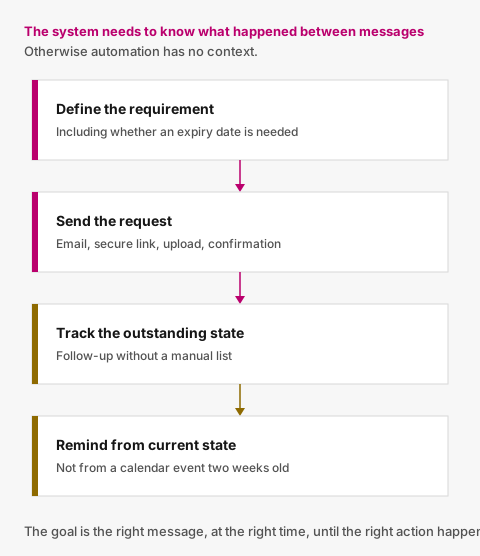
Figure 01
Initial request
The initial request tells the subcontractor what your organisation needs.
For example:
We require an updated Public Liability Insurance certificate.
Reminder
A reminder tells them that an existing request still needs attention.
For example:
Your Public Liability Insurance certificate is still outstanding.
Or:
Your current certificate expires in 14 days. Please upload a replacement.
The system needs to know what happened between those messages.
Otherwise, the automation has no context.
A useful document-request workflow
A simple process can look like this:
Step 1 — Define the requirement
Your organisation decides that a subcontractor must provide a particular company-level document.
For example:
Public Liability Insurance
You may also record whether the requirement needs:
- an expiry date;
- an issue date;
- a reference or certificate number; or
- additional notes.
Step 2 — Send the request
The subcontractor receives a message explaining what needs attention.
Rather than asking them to reply with an attachment, give them a direct way to respond to the requirement.
A low-friction flow is:
Email → secure link → upload → confirmation
The fewer unnecessary steps you introduce, the more likely the request is to be completed without support.
Step 3 — Track the outstanding state
Once the request has been sent, the system should know that the document remains outstanding.
That makes follow-up possible without somebody manually building a list.
Step 4 — Send reminders
If the subcontractor has not responded after an appropriate period, send another message.
For example:
You still have one document requiring attention.
The important thing is that the reminder is generated from the current state of the requirement.
Not from a calendar event somebody created two weeks ago.
Automating missing-document reminders
A simple reminder schedule might start with:
Day 0
Initial document request.
Day 7
First reminder if the requirement remains unresolved.
Every 7 days afterwards
Continue follow-up until something changes.
This is deliberately simple.
You can always introduce more configuration later.
But for many businesses, consistent automatic follow-up is more valuable than having twenty different reminder settings nobody uses.
Expiry reminders need a different schedule
Expiry is more predictable because you know the deadline in advance.
Suppose a certificate expires on:
30 November
A structured process might work like this.
30 days before expiry
Status changes to:
Expiring soon
The subcontractor receives a request for a replacement.
14 days before expiry
No replacement?
Send another reminder.
7 days before expiry
Still unresolved?
Remind them again.
1 day before expiry
Send a final pre-expiry reminder.
Expiry date
If no acceptable replacement has been approved, the requirement becomes:
Expired
After expiry
Continue periodic follow-up until the issue is resolved.
The exact timings are less important than one principle:
The system should move from date → status → action automatically.
Someone shouldn't need to inspect a spreadsheet every Monday to discover which emails need sending.
Don't send one email per document
Imagine a subcontractor currently has:
- one expired insurance certificate;
- one missing safety certificate; and
- one certification expiring in 14 days.
Sending three separate emails is unnecessary.
A better message might say:
ABC Electrical has 3 documents requiring attention:
Public Liability Insurance — Expired
Safety Certificate — Missing
ISO 9001 — Expires in 14 daysView and upload documents
One message.
One link.
One place to respond.
That is easier for both parties.

Photo 02
The most important automation rule: know when to stop
Imagine this sequence.
Monday
Insurance expires in 14 days.
Reminder sent.
Tuesday
The subcontractor uploads the replacement.
Wednesday
The next scheduled reminder process runs.
Should the subcontractor receive another email?
No.
They have completed their part of the process.
The current state should now be:
Replacement received — Pending review
The next action belongs to your team.
A reminder system that ignores this distinction creates unnecessary noise.
Good automation should stop or pause reminders when:
- an appropriate replacement is awaiting review;
- the replacement has been approved;
- the requirement no longer applies;
- the document requirement has been archived; or
- the subcontractor is no longer active.
Good automation doesn't send more emails. It knows when not to send one.
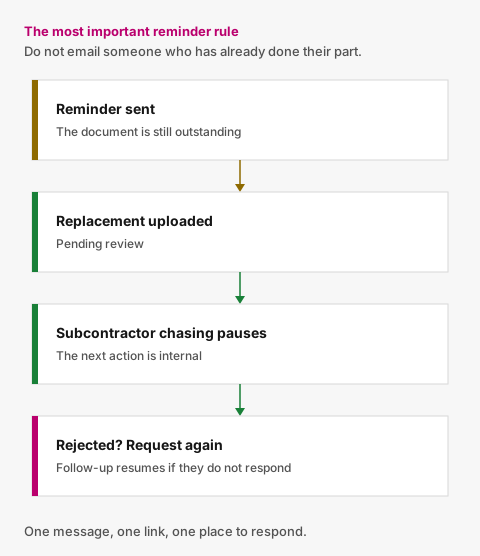
Figure 02
Rejected documents need to restart the right workflow
Now imagine your team reviews the replacement and discovers that it is incorrect.
Perhaps:
Certificate belongs to the wrong company.
The document is rejected.
What happens next?
The subcontractor should receive a clear request to replace it.
The requirement should return to the appropriate unresolved state.
And automated follow-up should continue if they don't respond.
The important thing is that the system follows the actual document lifecycle.
Not a static series of scheduled emails.
Keep reminder messages useful
A reminder should answer three questions immediately.
1. Who is asking?
Make the requesting organisation clear.
2. What requires attention?
Don't send:
You have outstanding compliance requirements.
Send:
Public Liability Insurance — Expired
3. What should the subcontractor do?
Give them a direct action.
For example:
View & Upload Documents
Avoid making them search for an old email, find an internal portal or reply asking what you need.
Avoid creating another account for the subcontractor
Your internal team may use the document system every day.
The subcontractor may interact with it three times per year.
Those are completely different use cases.
Requiring an external subcontractor to:
- register;
- create a password;
- verify their email;
- log in;
- find your organisation;
- locate the outstanding requirement; and
- upload the document
creates unnecessary friction.
For a straightforward document request, a secure link is often a better interaction.
The recipient opens the request, sees what needs attention and responds.
That's it.
Track what reminders were actually sent
Automation should also leave a useful record.
Your team should be able to understand:
- when the original request was sent;
- when reminders were sent;
- which requirements were included;
- who the recipient was;
- whether a new document subsequently arrived; and
- whether the issue has been resolved.
This matters both operationally and for troubleshooting.
If somebody says:
We never received a reminder.
you should have more to work with than:
I think the system sent one.
Automation should reduce work, not remove judgement
There is an important line to draw.
Software can automatically determine that:
The recorded expiry date is 14 days away.
It can automatically:
Send a reminder.
It can automatically:
Mark that a replacement has arrived.
But your organisation should still determine whether the submitted document is acceptable.
That distinction is important.
The useful automation is around the repetitive administrative process.
Human judgement remains where human judgement is actually required.
What should your team see?
While subcontractors receive targeted reminders, your internal users should have a simple overview.
For example:
Action required
Missing and expired requirements.
Awaiting review
Documents that have arrived and require a decision.
Expiring soon
Approved documents approaching expiry.
Current
Requirements with approved current documents.
This allows the team to focus on exceptions instead of inspecting every subcontractor individually.
What should happen when everything works?
A well-designed renewal can feel almost uneventful.
For example:
30 days before expiry
Automatic reminder sent.
22 days before expiry
Replacement uploaded.
Same day
Internal user notified.
21 days before expiry
Replacement reviewed and approved.
After approval
Future reminders for the old expiry stop.
Result
Requirement remains current.
Old document stays in history.
Nobody creates a calendar reminder.
Nobody manually updates a spreadsheet.
Nobody sends a “just following up” email.
That is what useful automation looks like.
Start by automating the predictable parts
You don't need a complex workflow engine.
Start with a few clear rules:
- missing documents trigger follow-up;
- approaching expiries trigger renewal requests;
- unresolved requests receive reminders;
- received replacements pause subcontractor chasing;
- rejected replacements require another submission;
- approved replacements resolve the requirement.
Those rules cover a surprisingly large part of the administrative workload.
Let the system do the chasing
Valar is designed around this workflow.
Your organisation defines the company-level documents each subcontractor should provide.
Valar tracks whether those requirements are missing, awaiting review, valid, approaching expiry or expired.
When something needs attention, subcontractors can receive a secure link showing exactly what needs to be provided.
Routine follow-up can happen automatically.
Once a replacement arrives, unnecessary reminders pause while your team reviews it.
Your team makes the important decisions.
Valar keeps the administrative process moving.
See what subcontractor compliance software should do for the rest of that workflow.
Photo 03
Photo credits
- Photo 01 by Brett Jordan
- Photo 02 by John Schnobrich
- Photo 03 by Luke Chesser
Put document tracking in one place
You define what you require. Subcontractors upload from a secure link. Your team reviews. Reminders handle the rest.