Certificate expiry tracking: a practical guide for operations teams
By Simone Rabelo · 8 September 2026
Learn how to track certificate expiry dates, organise renewals and automate reminders without relying on spreadsheets and calendar alerts.
Certificate expiry tracking sounds like a simple administrative task.
Record the certificate.
Record the expiry date.
Set a reminder.
Done.
That approach works while the number of certificates is small.
Then the dates multiply.
One certificate expires next month. Another has no expiry date. A renewal has been received but not reviewed. A colleague has a replacement sitting in their inbox. Someone updates the spreadsheet but forgets to replace the document in the shared folder.
The challenge is no longer remembering dates.
It is managing the workflow around those dates.
What is certificate expiry tracking?
Certificate expiry tracking is the process of recording certificates with their relevant expiry or renewal dates and making sure action happens before those dates pass.
A useful process should tell you:
- what certificate is being tracked;
- which company or record it belongs to;
- when it expires;
- whether it is approaching expiry;
- whether a replacement has been requested;
- whether a replacement has arrived;
- whether somebody has reviewed it; and
- what happened to the previous certificate.
That last part matters.
A date is not a workflow.
Good expiry tracking connects the date to the actions required before and after it.

Photo 01
Why expiry dates get missed
Most organisations do not deliberately ignore expiries.
They build processes that depend on people remembering to inspect several disconnected systems.
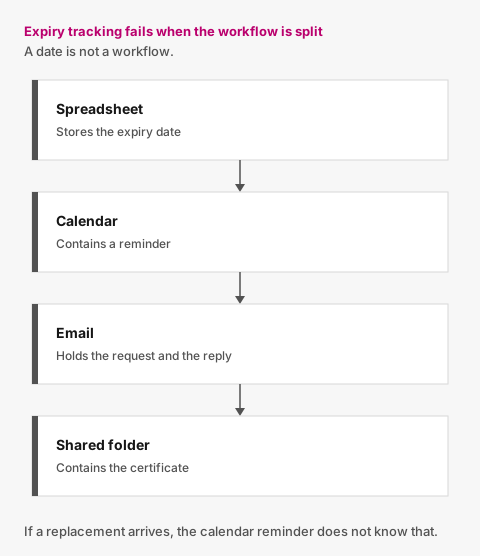
Figure 01
For example:
Spreadsheet
Stores the expiry date.
Calendar
Contains a reminder.
Contains the renewal request and response.
Shared folder
Contains the certificate.
Each tool can do its job.
The difficulty is keeping all four consistent.
If a replacement arrives after the calendar reminder was created, the reminder does not know that.
If somebody updates the spreadsheet but not the folder, the status and evidence disagree.
If the person responsible is away, another colleague may not know which follow-ups are already in progress.
This is why certificate expiry tracking often becomes an operational problem rather than a date-management problem.
Start with structured certificate information
If an expiry date matters, do not leave it only inside the PDF.
Record the information your process needs.
Depending on the certificate, that might include:
- company or subcontractor;
- certificate type;
- issue date;
- expiry date;
- certificate or reference number;
- original filename;
- date received;
- current review status;
- reviewer;
- date approved; and
- notes where appropriate.
Not every certificate needs every field.
Some certificates do not expire at all.
Your system should be able to represent both:
Expiry required
and:
No expiry date
without forcing artificial data.
Separate the requirement from each certificate
This is one of the most useful design principles.
Imagine your organisation requires:
Safety Certificate
That requirement may continue for years.
But the document satisfying it changes.
For example:
2025 certificate
Approved
Expired 31 December 2025
2026 certificate
Approved
Expires 31 December 2026
2027 replacement
Uploaded
Awaiting review
The requirement is persistent.
The submissions are historical.
If you treat the latest file as the requirement itself, renewals become messy.
If you separate the two, every replacement becomes another submission in a clear lifecycle.
Use statuses, not just dates
A list of dates forces the user to interpret what is happening.
A useful certificate expiry tracker should turn those dates and actions into understandable statuses.
For example:
Current
The certificate has been approved and is outside the warning period.
Expiring soon
The certificate remains current but its expiry date is approaching.
Pending review
A new or replacement certificate has arrived and needs a decision.
Expired
The approved certificate has passed its expiry date and no approved replacement is current.
Missing
There is no approved current certificate and no appropriate replacement awaiting review.
This gives your team an operational view rather than a date table.
Choose a warning period
The right warning period depends on the document and organisation.
A simple process may use one standard period.
For example:
Flag certificates as expiring soon 30 days before expiry.
The advantage of a standard warning period is predictability.
Your team knows exactly what “Expiring soon” means.
You can always introduce more configuration later if different certificate types genuinely require different lead times.
For an early process, consistency is often more useful than complexity.

Photo 02
Turn the warning period into action
Simply colouring a date amber 30 days beforehand does not solve the renewal problem.
Something still needs to happen.
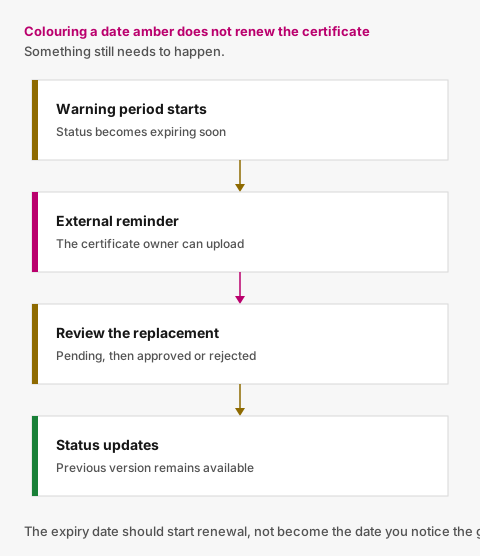
Figure 02
If the certificate belongs to a subcontractor, supplier or another external company, the system can trigger a renewal request.
For example:
30 days before expiry
Your Public Liability Insurance certificate expires in 30 days. Please provide an updated document.
14 days before expiry
No replacement received?
Send a reminder.
7 days before expiry
Still unresolved?
Follow up again.
1 day before expiry
Final pre-expiry reminder.
On expiry
If no approved replacement exists:
Expired
After expiry
Continue follow-up at an appropriate interval until resolved.
A schedule does not have to be complicated to remove a large amount of repetitive work.
Good reminders depend on the current state
This is where many reminder systems break down.
Imagine:
Day 30
Renewal reminder sent.
Day 24
Replacement uploaded.
Day 14
Scheduled second reminder becomes due.
Should it be sent?
Probably not.
The external company has already responded.
The next action belongs to your team:
Review replacement certificate.
That means reminder logic should not depend on the date alone.
It should also ask:
Has an appropriate replacement already arrived?
If yes, expiry chasing can pause.
If your team later rejects the replacement, the requirement becomes unresolved again and follow-up can resume.
The date tells you when to look. The status tells you what to do.
Keep the review step
Automation can tell you a certificate arrived.
It should not automatically assume the certificate is acceptable unless your organisation has deliberately implemented a reliable verification process for that purpose.
A replacement could be:
- for the wrong company;
- already expired;
- the wrong certificate type;
- incomplete;
- unreadable; or
- unsuitable for the requirement your organisation configured.
A simple review workflow works well:
Pending → Approved / Rejected
If rejected, store the reason.
That gives the external company something useful to act on and gives your internal team a record of the decision.
Preserve every replacement
A renewal should not overwrite the previous certificate.
Keeping history allows you to answer:
- What document did we have before this one?
- When did it expire?
- When did the replacement arrive?
- Was any submission rejected?
- Who approved the current version?
A clean record is more valuable than a folder containing only the newest file.
It also means an early replacement can be uploaded while the old certificate remains current.
The system can show both situations without losing context.
Track activity around the certificate
The certificate itself is only part of the story.
Useful activity might include:
- certificate requested;
- reminder sent;
- file uploaded;
- approved;
- rejected;
- expiry date corrected;
- certificate expired; and
- replacement approved.
That history makes troubleshooting easier.
If somebody asks why a certificate remained expired for two weeks, you can see what actually happened.
Build an exception-based expiry dashboard
Most users do not need to look at every current certificate every day.
They need to see the exceptions.
A useful dashboard might contain:
Expired
Needs action now.
Expiring soon
Renewal process should be underway.
Awaiting review
The replacement has arrived; your team needs to act.
Missing
No acceptable current certificate exists.
Everything else can stay out of the way.
This is one reason expiry software can be more useful than increasingly elaborate spreadsheet formatting.
The system is designed around the work queue.
Who should receive expiry reminders?
There are two different audiences.
Internal reminders
Useful when your team must take an action itself.
External reminders
Useful when the certificate owner, subcontractor or supplier needs to provide a replacement.
For subcontractor documents, sending the reminder directly to the external contact can remove an entire manual step.
Instead of:
System reminds administrator → administrator emails subcontractor
you get:
System reminds subcontractor → subcontractor uploads replacement
Your team only becomes involved when review or an exception requires human attention.
Make replacement submission easy
There is little value in sending automated reminders if responding is unnecessarily difficult.
The reminder should lead to the action.
For example:
Public Liability Insurance — expires in 14 days
[Upload replacement]
If an external user only needs to interact with your system occasionally, consider whether an account and password are really necessary.
A secure request link can be significantly simpler.
Moving from an expiry spreadsheet
If you currently manage expiries in Excel, do not begin by recreating every column in new software.
Start by identifying the information the workflow actually needs.
A practical migration sequence is:
- list active companies or subcontractors;
- identify the certificate requirements that still matter;
- attach the latest approved certificate;
- record the relevant expiry date;
- mark anything already expired;
- identify replacements already awaiting review;
- start the reminder process; and
- add older history where it has genuine operational value.
The objective is not to preserve spreadsheet complexity.
It is to simplify the process.
Questions to ask when choosing certificate expiry software
Can it track certificates against the right company or requirement?
A generic list of dates may not be enough.
Does it distinguish expiring from expired?
You need different actions.
Can a replacement be pending while the current certificate still exists?
That is a common real-world state.
Do reminders stop when a replacement arrives?
They should not keep chasing somebody who has already responded.
Can the replacement be reviewed?
Receiving and approving are different actions.
Is the previous certificate preserved?
Renewal should create history.
Can external contacts provide replacements easily?
This strongly affects response friction.
Can the team see exceptions immediately?
Expired, expiring, missing and awaiting review should be obvious.
The goal is not better reminders
The real objective of certificate expiry tracking is not to create a more sophisticated notification system.
It is to make renewals routine.
A certificate approaches expiry.
The right person is contacted.
A replacement arrives.
Your team reviews it.
The previous version remains available.
The status updates.
Nothing slips through simply because nobody opened the spreadsheet that week.
Certificate expiry tracking in Valar
Valar applies this workflow specifically to company-level subcontractor documentation.
Your organisation defines the documents it requires.
Valar tracks the approved documents and their expiry dates, surfaces upcoming expiries, sends routine reminders and gives subcontractors a secure way to provide replacements without creating an account.
When a replacement arrives, reminders can pause while your team reviews it.
Previous submissions remain in the history.
The expiry date should start the renewal process, not become the date you discover the problem.
Related reading: document expiry tracking and insurance expiry tracking.

Photo 03
Photo credits
- Photo 01 by Aron Visuals
- Photo 02 by Luke Chesser
- Photo 03 by Eric Rothermel
Put document tracking in one place
You define what you require. Subcontractors upload from a secure link. Your team reviews. Reminders handle the rest.