If your organisation requires subcontractors to provide evidence of insurance, collecting the first certificate is usually not the difficult part.
Keeping it current is.
The certificate arrives.
Somebody saves the PDF.
The expiry date goes into a spreadsheet.
Months later, the date approaches.
Now somebody needs to notice it, request the replacement, follow up, receive the new certificate, review it and update the record.
That renewal loop is where subcontractor insurance tracking becomes an ongoing administrative job.
A good process should make that loop predictable.
First: decide what insurance evidence your organisation requires
There is no universal insurance checklist that applies to every subcontractor in every European country and industry.
The insurance evidence your organisation should request can depend on:
- jurisdiction;
- type of work;
- contract;
- customer requirements;
- risk profile; and
- professional or insurance advice.
So start there.
This article is about tracking insurance documents once your organisation has determined that it requires them.
It is not a statement that every subcontractor is legally required to hold any particular policy.
What should you record for an insurance certificate?
At minimum, the record needs to connect the document with the correct subcontractor and requirement.
Depending on your process, useful information may include:
- subcontractor company;
- insurance document type;
- original file;
- policy or certificate reference;
- issue date;
- expiry date;
- date received;
- review status;
- reviewer;
- approval date; and
- internal notes where appropriate.
The key field for renewal is obviously the expiry date.
But the expiry date alone is not enough.
You also need to know what is currently happening around it.
Treat the insurance requirement separately from the certificate
Imagine your organisation requires:
Public Liability Insurance
That is a continuing requirement.
The certificate satisfying it changes every year.
For example:
2025–2026 certificate
Approved
Expired 30 November 2026
2026–2027 certificate
Approved
Expires 30 November 2027
The requirement did not change.
The evidence did.
This distinction makes insurance renewal tracking much easier.
Each replacement becomes a new submission against the same requirement instead of overwriting the previous record.
Use clear insurance statuses
A spreadsheet often stores:
Expiry: 30/11/2026
Then the user has to interpret the date.
A better process turns the date and document lifecycle into a status.
Missing
Your organisation requires the document but no approved current certificate exists.
Pending review
A certificate has been submitted but has not yet been accepted.
Current
An approved certificate exists and is outside the warning period.
Expiring soon
The approved certificate is approaching expiry.
Expired
The expiry date has passed and no approved replacement exists.
These are operational document statuses.
They should not be presented as a universal determination that a subcontractor is legally compliant or legally entitled to perform work.
Start renewal before the expiry date
The expiry date is the deadline.
It should not be the first action date.
If you wait until the document expires before contacting the subcontractor, you have already created a gap in your internal process.
Instead, choose a warning period.
For example:
Begin renewal 30 days before expiry.
That gives the subcontractor time to respond and your team time to review the replacement before the existing certificate reaches its recorded expiry date.

Photo 01
A practical insurance renewal timeline
Suppose an approved certificate expires on:
30 November
A simple workflow could be:
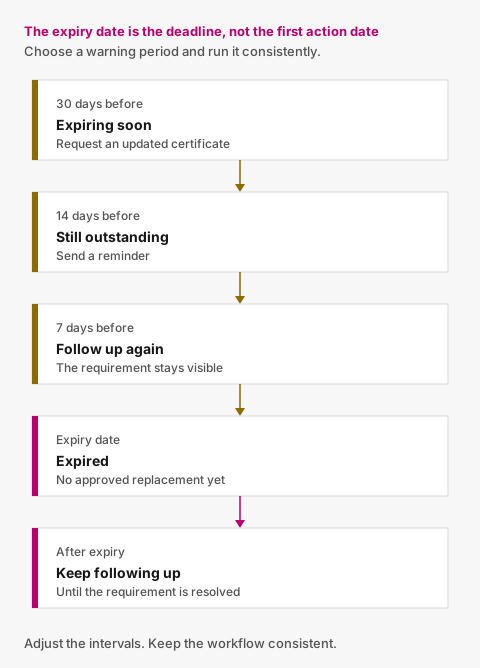
Figure 01
31 October — 30 days remaining
Change the requirement to:
Expiring soon
Send the subcontractor a request for an updated certificate.
16 November — 14 days remaining
No replacement received?
Send a reminder.
23 November — 7 days remaining
Still outstanding?
Follow up again.
29 November — 1 day remaining
Send a final pre-expiry reminder.
30 November — expiry
If no approved replacement exists, mark the requirement:
Expired
After expiry
Continue periodic reminders until the requirement is resolved.
You can adjust the intervals to suit your process.
The important thing is that the workflow runs consistently.
Send the subcontractor directly to the requirement
Traditional renewal chasing often looks like this:
Spreadsheet alert → administrator notices → administrator opens email → administrator explains what has expired → subcontractor replies with attachment → administrator saves file → administrator updates spreadsheet.
A more connected process can be:
Expiry approaching → reminder sent automatically → subcontractor opens secure link → sees the insurance requirement → uploads replacement.
That removes several manual handoffs.
It also gives the recipient clearer context.
Instead of:
Please send your updated paperwork.
they see:
Public Liability Insurance — expires in 14 days.
Don't force occasional uploaders through unnecessary account setup
Your team may use the system constantly.
The subcontractor may need it once or twice per year.
For a simple insurance renewal, requiring them to:
- create an account;
- create a password;
- verify their email;
- log in;
- navigate a portal; and
- find the right requirement
may create more friction than value.
A secure request link can be more appropriate.
The recipient opens the link, sees what needs attention and uploads the replacement.

Photo 02
Receiving the replacement is not the end
A new certificate has arrived.
What now?
Someone should review it.
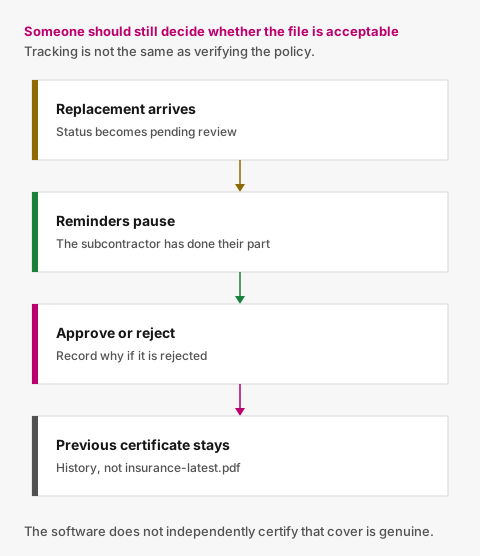
Figure 02
A replacement might be:
- for the wrong subcontractor;
- the wrong type of insurance document;
- already expired;
- incomplete;
- unreadable; or
- otherwise unsuitable for the requirement your organisation has configured.
The new submission should therefore begin as:
Pending review
An authorised user can then:
Approve
or:
Reject
If rejected, record why.
For example:
Certificate belongs to a different company.
That makes the next request much clearer.
Stop chasing while the replacement is being reviewed
This is one of the most important pieces of renewal logic.
Imagine the current certificate expires in seven days.
The subcontractor uploads a replacement today.
Your team has not reviewed it yet.
Tomorrow's scheduled reminder process runs.
Should it send:
Your insurance expires in six days. Please upload a replacement.
No.
The subcontractor already has.
The requirement should now communicate:
Replacement received — awaiting review.
Automated insurance reminders should normally pause while an appropriate replacement is pending review.
If the replacement is later rejected, follow-up can resume.
What if the replacement arrives early?
This is another reason not to model insurance as a single file field.
Suppose the current certificate does not expire for another three weeks, but the subcontractor submits the next policy period early.
You can have:
Current approved certificate
Still valid until 30 November.
New certificate
Pending review.
Both records can exist at the same time.
Once the replacement is approved, it becomes the relevant current submission according to your process.
The previous certificate remains in history.
You do not need to destroy one state to represent the other.
Preserve previous insurance certificates
When a renewal is approved, do not overwrite last year's certificate.
A useful history might show:
Current
2027 Public Liability Insurance
Approved 18 November 2026
Expires 30 November 2027
Previous
2026 Public Liability Insurance
Approved 21 November 2025
Expired 30 November 2026
Rejected
Replacement uploaded 14 November 2026
Rejected — Incorrect company name
That tells you far more than a folder containing:
PL-insurance-latest.pdf
Keep a reminder history too
It can be useful to know:
- when the renewal request was first sent;
- when reminders were sent;
- which email address received them;
- when the replacement arrived;
- who reviewed it; and
- when it was approved or rejected.
This makes the process easier to share across a team.
It also means one person being away does not remove all the context.
What should an insurance tracker show?
At a minimum, you should be able to answer:
Which subcontractors have missing insurance documents?
These require collection.
Which certificates expire soon?
These require renewal.
Which are already expired?
These need immediate attention.
Which replacements are awaiting review?
These require internal action rather than another subcontractor reminder.
What is the next expiry date for each subcontractor?
This helps prioritise upcoming work.
The objective is to make the next action obvious.
A simple insurance tracking spreadsheet
If you only manage a small number of subcontractors, a spreadsheet can be enough.
A simple structure might be:
| Subcontractor | Insurance requirement | Status | Expiry | Replacement | Last reminder |
|---|---|---|---|---|---|
| ABC Electrical | Public Liability | Expiring soon | 30 Nov | Not received | 31 Oct |
| Smith HVAC | Public Liability | Pending review | 12 Nov | Received | — |
| Northside Ltd | Public Liability | Current | 18 May | — | — |
That is a sensible starting point.
The spreadsheet becomes difficult when the workflow around those cells grows.
For example:
- several people send reminders;
- documents arrive in different inboxes;
- replacements need approval;
- old certificates must be preserved;
- reminder schedules need maintaining;
- the spreadsheet and folder frequently disagree; or
- somebody has to review the tracker every week just to decide who to contact.
At that point, dedicated software can remove more work than another formula will.
Spreadsheet tracking vs a connected insurance workflow
A spreadsheet can tell you:
Insurance expires in 14 days.
A connected workflow can do:
Insurance expires in 14 days
→ remind subcontractor
→ receive replacement
→ pause reminders
→ ask internal user to review
→ approve replacement
→ preserve old certificate
→ update current status
That is the key difference.
The date is only one piece of the process.
Don't confuse tracking with verification
Insurance tracking software can help you maintain the documents your organisation has decided to request.
That does not necessarily mean the software has independently verified:
- that the policy is genuine;
- that all coverage is still in force;
- that the limits are suitable;
- that every endorsement you require is present;
- that the insurer remains valid; or
- that the subcontractor satisfies all applicable legal and contractual obligations.
Unless a product explicitly provides a reliable verification service for a specific purpose, those decisions remain with the organisation and its advisers.
For a focused document tracker, this is a feature rather than a deficiency.
It keeps the software responsible for the administrative workflow instead of pretending to make decisions it cannot safely make.
A better subcontractor insurance renewal process
The ideal process is not complicated.
Your organisation defines the requirement.
The certificate is collected and reviewed.
Its expiry date is tracked.
Renewal starts before expiry.
The subcontractor is reminded automatically.
A replacement is submitted.
Your team reviews it.
The old certificate stays in history.
Then the cycle repeats.
What disappears is the repetitive coordination around it.
Insurance expiry tracking in Valar
Valar helps organisations keep company-level subcontractor documents such as insurance certificates connected to the requirements they belong to.
You define which documents are required.
Valar tracks their recorded expiry dates, surfaces upcoming renewals, sends routine reminders and gives subcontractors a secure no-account route to upload replacements.
When the replacement arrives, your team reviews it.
The previous certificate remains in the document history.
Valar does not decide which insurance your subcontractor is legally required to hold and does not independently certify legal compliance.
It keeps the process your organisation has chosen from quietly falling out of date.
The useful outcome is having the replacement before the date becomes a problem.
Related reading: certificate expiry tracking and document expiry tracking.

Photo 03
Photo credits
- Photo 01 by Kelly Sikkema
- Photo 02 by Aron Visuals
- Photo 03 by Eric Rothermel
Put document tracking in one place
You define what you require. Subcontractors upload from a secure link. Your team reviews. Reminders handle the rest.