7 signs you've outgrown your subcontractor compliance spreadsheet
By Simone Rabelo · 8 September 2026
Is your subcontractor compliance spreadsheet becoming harder to maintain? Here are 7 signs your document tracking process has outgrown Excel.
There is nothing wrong with managing subcontractor documents in a spreadsheet.
In fact, for a small number of subcontractors, it may be exactly the right tool.
You create a row for each company, add columns for the documents you require, enter the expiry dates and perhaps colour-code anything that needs attention.
Simple.
The problems usually appear gradually.
The spreadsheet grows. Documents arrive in different inboxes. Someone forgets to update a date. A replacement certificate is sitting in a shared folder but still appears as expired in Excel.
Eventually, the spreadsheet isn't really managing the process.
It is summarising a process that is happening somewhere else.
Here are seven signs you may have reached that point.

Photo 01
1. Someone has to check the spreadsheet to find out who needs chasing
A spreadsheet can tell you that a document is missing.
It cannot ask the subcontractor for it.
So the real workflow becomes:
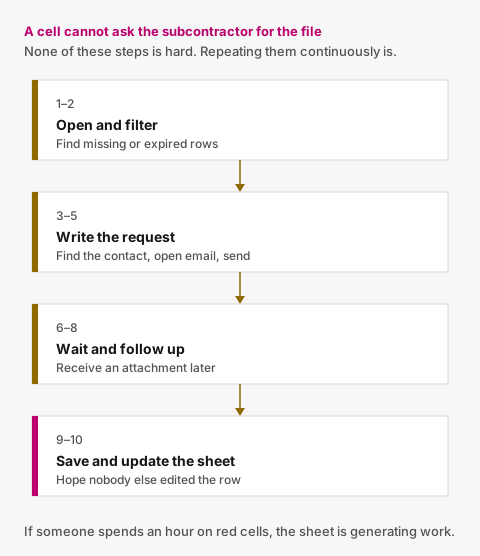
Figure 01
- open the spreadsheet;
- filter for missing or expired documents;
- identify the correct contact;
- open your email;
- write the request;
- wait;
- follow up;
- receive an attachment;
- save the attachment;
- update the spreadsheet.
None of those steps is particularly difficult.
The problem is having to repeat them continuously.
If someone on your team regularly spends an hour going through red cells and sending reminder emails, your spreadsheet is no longer reducing administrative work.
It is generating a to-do list.
A more structured process connects the document status directly to the follow-up.
If a required document is missing or approaching expiry, the reminder can happen without somebody first discovering the problem manually.
2. Your spreadsheet and document folder disagree
This is one of the clearest warning signs.
The spreadsheet says:
Public Liability Insurance — Expired
But the shared folder contains:
insurance-new.pdf
Which one is correct?
Maybe the replacement arrived yesterday.
Maybe nobody reviewed it.
Maybe somebody reviewed it but didn't update the spreadsheet.
Maybe the file belongs to a different subcontractor.
Maybe the old document was replaced without anybody preserving its history.
Once the status and the document live in separate systems, they can drift apart.
You no longer have one source of truth.
Instead, you have to reconstruct the truth from several sources:
- Excel;
- Outlook;
- SharePoint or Drive;
- calendar reminders; and
- the knowledge of whoever normally manages the process.
That gets increasingly fragile as the number of subcontractors grows.
3. You have created increasingly complicated spreadsheet logic
Your original spreadsheet probably started simply.
Perhaps:
| Subcontractor | Insurance | Expiry |
|---|---|---|
| ABC Electrical | Received | 30 Nov 2026 |
Then you needed more information.
So you added:
- conditional formatting;
- formulas for days until expiry;
- a status column;
- a reviewer column;
- a last-reminder date;
- a link to the document;
- another column for the replacement;
- another tab for archived subcontractors;
- another sheet for outstanding requests.
Before long, the spreadsheet itself becomes a small software application.
Except you are responsible for maintaining it.
There is a useful point to recognise here:
The more workflow you try to encode into Excel, the stronger the signal that you actually have a workflow problem rather than a spreadsheet problem.
Excel remains excellent at analysing structured information.
It is much less suited to coordinating requests, uploads, approvals, expiry monitoring and repeated follow-up between several people.
4. A replacement document creates confusion
Document renewals are deceptively difficult to model in a simple spreadsheet.
Imagine a subcontractor has an insurance certificate expiring on 30 November.
You ask for a replacement.
They upload one on 12 November.
Now what is the status?
The old document is still technically current.
The new document exists, but your team hasn't reviewed it.
A simple spreadsheet may force you to choose between:
Current
and:
Replacement received
But the real state is more useful:
Current document expires 30 November. Replacement received and awaiting review.
If the new document is rejected, the original requirement might still be approaching expiry.
If it is approved, the replacement should become current.
And the previous document should remain in the history rather than disappearing.
This lifecycle gets increasingly awkward when represented as cells.
A document system can model it directly.

Photo 02
5. You keep sending reminders after the subcontractor has already responded
This happens surprisingly often.
Someone reviews the spreadsheet on Monday morning.
A certificate is still marked as expiring.
They email the subcontractor.
The subcontractor sends a replacement that afternoon.
Another colleague checks the spreadsheet on Wednesday.
It still says:
Expiring
So they send another email.
From the subcontractor's perspective, your organisation looks disorganised.
From your team's perspective, everyone is doing exactly what the process told them to do.
The problem is that the process isn't connected.
A better workflow distinguishes:
Needs action from the subcontractor
from:
Needs action from our team
Once a replacement has arrived, routine expiry reminders should generally pause while somebody reviews it.
Good automation isn't about sending more reminders.
It is also about knowing when to stop sending them.
6. Only one person really understands the system
Ask yourself:
If the person who manages our subcontractor spreadsheet were away for three weeks, could somebody else immediately understand what needs attention?
If the answer is no, you have a process risk.
Often, the spreadsheet itself isn't the complete system.
One person also knows:
- which emails are still unanswered;
- where the documents are stored;
- which certificates were rejected;
- which subcontractors need another reminder;
- which dates are probably wrong;
- which rows should be ignored;
- which colour means what; and
- which exceptions aren't written down anywhere.
That knowledge works until it doesn't.
A shared operational system should allow an authorised colleague to open a subcontractor record and understand:
- what is required;
- what has been received;
- what has been approved;
- what is missing;
- what is expiring;
- what is awaiting review; and
- what happened previously.
Without needing a handover meeting.
7. You spend more time maintaining the tracker than acting on exceptions
This is the biggest sign of all.
A document-management process should help your team focus on exceptions.
For example:
These three subcontractors have expired documents.
These four submissions need review.
These two certificates expire next week.
Instead, spreadsheet-based systems often require administrative work just to establish that information.
People spend time:
- copying dates;
- renaming files;
- updating statuses;
- moving attachments;
- checking whether reminders were sent;
- reconciling discrepancies; and
- rebuilding context from old emails.
The tracker has become another thing that needs maintaining.
At that point, moving to a dedicated process isn't necessarily about adding functionality.
It is about removing coordination work.
When is a spreadsheet still enough?
A spreadsheet can remain perfectly sensible if:
- you have very few subcontractors;
- document requirements rarely change;
- only one or two documents expire;
- renewals are infrequent;
- there is little review workflow;
- follow-up volume is low; and
- your team is comfortable maintaining the process manually.
You don't need software simply because software exists.
The question is whether the administrative burden has become meaningful.
When should you consider a dedicated system?
A dedicated subcontractor document system starts making more sense when you want the system itself to understand the workflow.
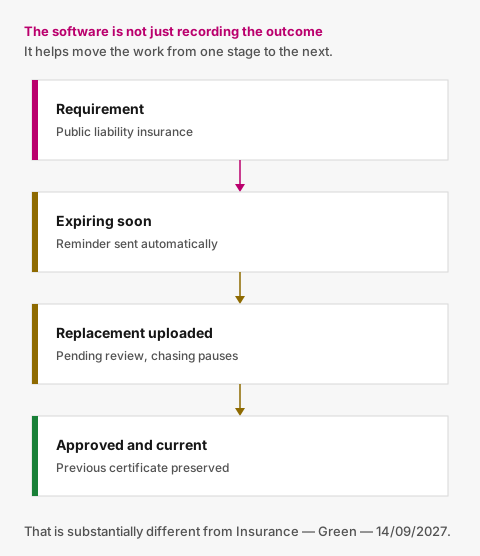
Figure 02
For example:
Requirement
Public Liability Insurance
Current state
Approved — expires in 18 days
System action
Reminder sent automatically
Subcontractor action
Replacement uploaded
New state
Pending review
Internal action
Approved
Final state
Current
History
Previous certificate preserved
That is substantially different from storing:
Insurance — Green — 14/09/2027
in a spreadsheet.
The software isn't just recording the outcome.
It is helping move the process from one stage to the next.
Start with the process, not the software
Before replacing your spreadsheet, map what your team actually does.
Ask:
- What documents do we require?
- Who decides which requirements apply?
- How do we request them?
- Where do subcontractors send them?
- Who reviews them?
- What happens when something is rejected?
- How do we track expiry?
- When do we send reminders?
- What happens after a replacement arrives?
- Do we need to preserve previous versions?
Once those answers are clear, choosing a system becomes much easier.
You're not shopping for a bigger spreadsheet.
You're looking for a workflow that reflects how the job actually works.
Moving beyond the spreadsheet
Valar is designed for organisations that have reached exactly this point.
You define the company-level documents you require from each subcontractor.
When something is missing or needs replacing, the subcontractor receives a secure link and can upload the requested document without creating an account.
Your team reviews submissions, Valar tracks expiry dates and routine reminders can happen automatically.
Previous submissions remain in the document history instead of being overwritten.
The aim is to remove the spreadsheet, inbox and calendar coordination currently required to keep the process running.
Your spreadsheet can tell you a certificate expired. Valar can help get the replacement back.
See how to manage subcontractor documents without spreadsheets for the workflow this replaces.

Photo 03
Photo credits
- Photo 01 by Glenn Carstens-Peters
- Photo 02 by Brett Jordan
- Photo 03 by Campaign Creators
Put document tracking in one place
You define what you require. Subcontractors upload from a secure link. Your team reviews. Reminders handle the rest.