How to manage subcontractor documents without spreadsheets and email
By Simone Rabelo · 8 September 2026
Still tracking subcontractor documents in spreadsheets and email? Learn how to build a simpler process for requests, approvals, expiry dates and renewals.
If you manage subcontractors, the document process often starts simply enough.
You create a spreadsheet.
One row per subcontractor. A few columns for insurance, registrations, certificates and expiry dates. Documents arrive by email and get saved somewhere in a shared folder.
For ten subcontractors, it works.
Then you have thirty.
Or fifty.
One certificate expires. Someone forgets to update the spreadsheet. A replacement arrives in somebody else's inbox. Another document has been uploaded but nobody has reviewed it yet.
Eventually, the spreadsheet stops being a record of what is actually happening.
It becomes a record of what someone last remembered to update.
That is the real subcontractor document-management problem.

Photo 01
The problem isn't storing documents
Most companies already have somewhere to put files.
SharePoint, Google Drive, Dropbox, a network folder or a project-management platform can all store PDFs perfectly well.
The difficult part is answering questions such as:
- Which subcontractors are missing documents?
- Which documents have expired?
- What expires in the next 30 days?
- Has the latest submission actually been reviewed?
- Who rejected the previous document, and why?
- Has a replacement already been requested?
- Has the subcontractor been reminded?
- Which version of the document is the current one?
A folder cannot answer those questions.
A spreadsheet can answer some of them—but only if someone continuously keeps it in sync with emails, files and follow-ups.
That manual synchronisation is where the process begins to break down.
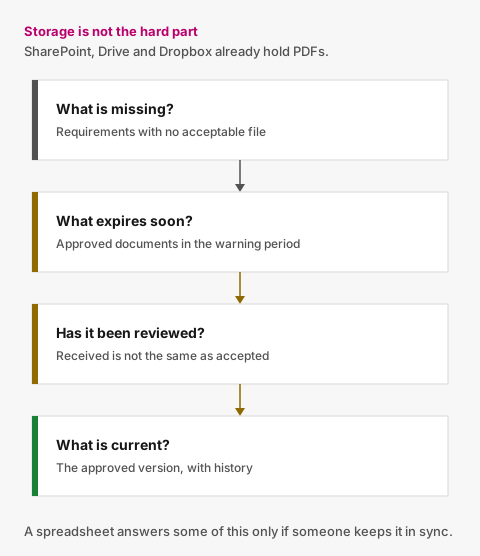
Figure 01
What a good subcontractor document process needs
You don't necessarily need a large contractor-management platform.
For many organisations, a much smaller workflow is enough.
1. One record for every subcontractor
Each subcontractor should have one clear record containing its contact details and the documents your organisation requires from it.
That means your team shouldn't have to search through an inbox to understand what is outstanding.
2. Requirements defined by your organisation
Different businesses require different documents.
One organisation might ask for:
- public liability insurance;
- company registration;
- professional accreditation;
- safety certification;
- environmental certification; or
- another company-level certificate.
Another may require a completely different set.
The important point is that the requirements should be defined deliberately rather than inherited from a spreadsheet somebody created three years ago.
3. A simple way to request documents
Document collection usually becomes painful because requesting and receiving documents happen in different systems.
Someone looks at a spreadsheet, identifies a missing document, writes an email, waits for a reply, downloads an attachment, files it and then updates the spreadsheet.
A better process links the request directly to the requirement.
The subcontractor receives a request showing exactly what needs attention and can respond from there.
Ideally, they should not have to create another account just to send you a PDF.
4. Review before a document becomes current
Receiving a file is not the same as accepting it.
A subcontractor might send:
- the wrong certificate;
- an expired document;
- a file belonging to another company;
- an incomplete document; or
- a document that does not satisfy your internal requirement.
The workflow should therefore distinguish between:
Missing → Submitted → Approved
with the possibility of:
Submitted → Rejected → Replacement requested
That distinction is difficult to represent reliably when everything is just a filename in a folder.
5. Expiry tracking
Collecting a document once only solves half the problem.
Many subcontractor documents expire.
If the expiry date lives exclusively inside a PDF—or in a spreadsheet nobody checks every day—the process depends on somebody remembering to look.
Instead, expiry dates should become active information.
You should be able to see what is:
- valid (approved and not close to expiry);
- approaching expiry;
- expired; or
- already awaiting a replacement.
6. Automatic follow-up
This is where a document-management system begins to remove work rather than simply organise it.
If a certificate is approaching its expiry date, the system can remind the subcontractor automatically.
If a required document is still missing, it can follow up again.
Once a replacement arrives, unnecessary reminders can stop.
Your team should spend its time handling exceptions and reviewing documents—not repeatedly sending the same “just following up” email.
7. Document history
Replacing a document should not mean deleting the old one.
Previous submissions can be useful when you need to understand what was held at a particular point in time.
A clear record might show:
- the current approved certificate;
- the previous expired certificate;
- a rejected submission;
- the replacement that followed it;
- when each was submitted; and
- who reviewed it.
That history is far more useful than a folder containing files called:
insurance.pdf
insurance-new.pdf
insurance-final.pdf
insurance-final-2.pdf
When does Excel stop being enough?

Photo 02
Spreadsheets are not inherently bad.
For a very small subcontractor list with few recurring requirements, Excel may be entirely adequate.
The warning signs appear when your team starts doing work around the spreadsheet just to keep the spreadsheet useful.
For example:
- checking expiry dates manually every week;
- maintaining colour-coded status columns;
- searching emails for attachments;
- sending repeated reminder emails;
- asking colleagues whether a document has been reviewed;
- creating calendar reminders for renewals;
- duplicating files between folders;
- keeping separate sheets for different document types; or
- discovering that the spreadsheet and the folder disagree.
At that point, the issue isn't that you need a better spreadsheet.
The workflow itself needs to be connected.
What subcontractor document software should—and shouldn't—do
There is a temptation to turn every operational problem into a huge software implementation.
You may not need project scheduling, worker onboarding, equipment management, procurement, invoicing, site access control and enterprise reporting just to keep subcontractor documents current.
A focused system should answer a smaller set of questions extremely well:
What do we require?
What have we received?
Has it been reviewed?
Is it still current?
What requires attention next?
For many operations, procurement and compliance teams, that is the job.
Everything else can stay where it already works.
Moving from a spreadsheet to a structured process
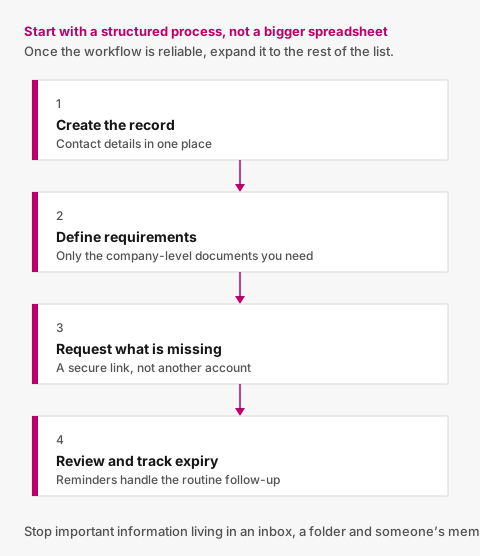
Figure 02
You don't need to migrate everything at once.
Start with one group of active subcontractors.
For each one:
- create the subcontractor record;
- define the company-level documents you require;
- record the current approved documents and their expiry dates;
- request anything missing;
- review new submissions;
- begin tracking upcoming expiries; and
- let reminders handle the routine follow-up.
Once that workflow is reliable, expand it to the rest of the subcontractor base.
The point is to stop important information living in an inbox, a folder, a spreadsheet and someone's memory.
A simpler way to manage the process
Valar is for organisations that have outgrown the spreadsheet-and-email approach but don't need a large contractor-management platform.
You define which company-level documents each subcontractor should provide.
Valar gives subcontractors a secure link where they can upload documents without creating an account, keeps submissions together for review, tracks expiry dates and sends reminders when attention is needed.
Your team stays responsible for deciding what documentation it requires and whether a submission is acceptable.
Valar keeps the process moving.
Read what subcontractor compliance software should actually do if you are comparing tools, or the signs you have outgrown a spreadsheet if you are still in Excel.
Photo 03
Photo credits
- Photo 01 by American Public Power Association
- Photo 02 by Brett Jordan
- Photo 03 by Luke Chesser
Put document tracking in one place
You define what you require. Subcontractors upload from a secure link. Your team reviews. Reminders handle the rest.