Subcontractor document checklist: what should you collect and keep current?
By Simone Rabelo · 8 September 2026
A practical framework for deciding which company-level subcontractor documents to collect, review and track throughout the relationship.
What documents should you collect from a subcontractor?
It sounds like a simple question.
Unfortunately, there is no universal list.
The documents that matter depend on factors such as your country, industry, contracts, the type of work being performed and your own risk-management procedures.
A construction contractor may require documents that are irrelevant to a property-management business. Requirements for an electrical contractor may be different from those for a cleaning company.
So rather than copying somebody else's checklist, it is more useful to build a repeatable framework for your organisation.
This article focuses on company-level subcontractor documentation rather than individual worker records.
It is an operational starting point—not legal advice or a declaration of what your organisation is legally required to collect.

Photo 01
1. Company identity information
Start with the information that tells you exactly which legal or trading entity you are dealing with.
Depending on your circumstances, that might include:
- legal company name;
- trading name;
- company registration number;
- VAT number;
- registered address;
- primary contact;
- contact email; and
- telephone number.
This sounds basic, but consistent company identification matters when documents start arriving.
A certificate belonging to a similarly named company should not accidentally be accepted against the wrong subcontractor record.
2. Insurance documentation
Insurance certificates are one of the most common documents organisations track for subcontractors.
The specific coverage and evidence you should require depends on your contract, jurisdiction, insurer and the work involved.
From a document-management perspective, useful information may include:
- document type;
- certificate or policy reference;
- issue date;
- expiry date;
- date received;
- review status; and
- previous versions.
The critical operational question isn't simply:
Do we have an insurance PDF?
It is:
Do we have the current document that satisfies the requirement our organisation has set?
3. Company registrations and licences
Certain subcontractors may need registrations, licences or authorisations connected to the work they perform.
Where these apply, keep the requirement explicit.
Useful information might include:
- type of licence or registration;
- issuing body;
- reference number;
- issue date;
- expiry date; and
- current document.
Some registrations may not expire. Others may require periodic renewal.
Your tracking process should support both situations rather than assuming every document has an expiry date.
4. Quality, safety or industry certifications
Your organisation may require subcontractors to provide evidence of specific certifications or accreditations.
Examples might include:
- quality-management certifications;
- environmental certifications;
- health and safety certifications;
- trade accreditations; or
- customer-specific approved-contractor certifications.
Again, the software should not decide whether these are legally required.
Your organisation should determine what applies.
The document process should then make it easy to see whether the requested evidence has been received, reviewed and kept current.
5. Customer or contract-specific documentation
Sometimes a document is required not because legislation says so, but because your own organisation, customer or contract requires it.
This distinction matters.
A good subcontractor-document checklist therefore shouldn't contain only generic industry documents.
It should also give you a clear way to add the documents your organisation expects.
For each requirement, define:
- what document is required;
- which subcontractors it applies to;
- what the subcontractor should provide;
- whether an issue date is needed;
- whether a reference number is needed;
- whether an expiry date is required;
- who reviews it; and
- what happens when it expires.
That turns a checklist into an actual process.
A checklist is only the beginning
Many companies have no problem creating a list of required documents.
The problem comes afterwards.
Imagine that you require six documents from each subcontractor.
You have 80 active subcontractors.
That is potentially 480 individual requirements to keep track of.
Some never expire.
Some expire annually.
Some are replaced early.
Some arrive with incorrect information.
Some get rejected.
Some are requested repeatedly before the subcontractor responds.
The challenge quickly changes from:
What documents do we need?
to:
What is the current status of every requirement right now?
That is where spreadsheets often become difficult to maintain.
Use clear statuses
You should be able to look at any requirement and understand immediately what is happening.
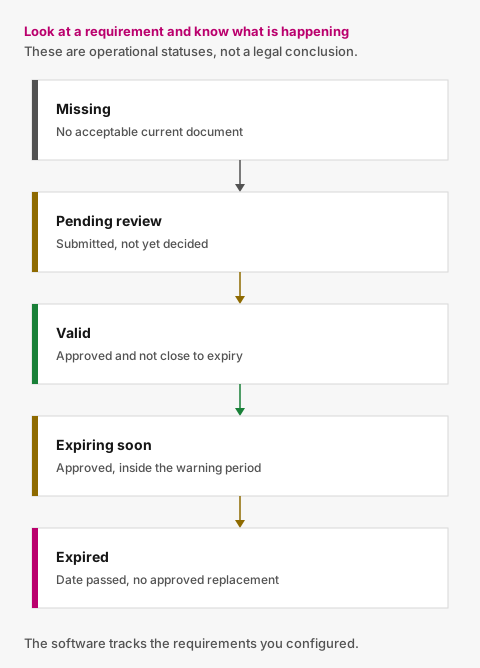
Figure 01
A simple model could be:
Missing
No acceptable current document has been received.
Pending review
A document has been submitted but your team has not yet accepted or rejected it.
Valid
The document has been approved and is not close to expiry.
Expiring soon
The approved document is approaching its expiry date.
Expired
The approved document has passed its expiry date and no approved replacement exists.
These are operational statuses.
They are not a legal determination of whether the subcontractor is compliant with every law or contractual obligation that might apply.
Don't overwrite previous documents

Photo 02
When a new certificate arrives, it is tempting to replace the old file.
That keeps the folder tidy.
It also removes useful history.
A better record preserves:
- the old document;
- when it was originally submitted;
- its former expiry date;
- the replacement;
- when the replacement arrived; and
- the review decision attached to each submission.
If somebody later asks what document you held six months ago, you should not need to reconstruct the answer from archived emails.
Decide who owns the review
Receiving a document does not necessarily mean the requirement has been satisfied.
Define who can decide whether a submission is acceptable.
Your workflow should make it clear whether a document is:
- awaiting review;
- approved; or
- rejected.
If rejected, record the reason.
That gives the subcontractor useful information when providing a replacement and gives your team a clear record of what happened.
Track expiry from the moment a document is approved
An expiry date hidden inside a PDF isn't much help.
Once a document with an expiry date is approved, the date should become part of the tracking process.
You should then be able to identify:
- everything expiring within your warning period;
- everything already expired; and
- everything for which a replacement has already been submitted.
Without that distinction, teams often continue chasing subcontractors even after a replacement has arrived.
Make renewals part of the same workflow
The document lifecycle doesn't end at approval.
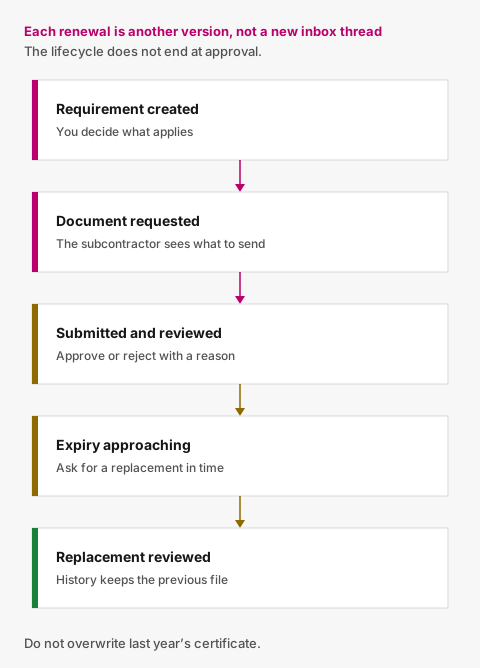
Figure 02
A more useful model is:
Requirement created
→ Document requested
→ Document submitted
→ Reviewed
→ Approved
→ Expiry approaching
→ Replacement requested
→ Replacement submitted
→ Reviewed again
Each renewal becomes another version in the history rather than a new disconnected email conversation.
A practical starting checklist
For each subcontractor, consider whether your organisation needs to track any of the following categories:
Company details
- Legal/trading name
- Registration number
- VAT information
- Primary contact details
Insurance
- Relevant insurance certificates
- Reference information
- Issue and expiry dates where applicable
Registrations and licences
- Applicable company registrations
- Trade licences
- Professional authorisations
Certifications
- Quality certifications
- Environmental certifications
- Safety certifications
- Industry accreditations
Organisation-specific requirements
- Any other company-level evidence required by your contracts, customers or internal procedures
Then define which of those requirements apply to each subcontractor.
That is more useful than treating every subcontractor identically.
From checklist to ongoing control
The best subcontractor document checklist isn't the one with the most items.
It's the one your team can actually keep current.
Valar lets organisations define their own company-level document requirements, request those documents from subcontractors and track each requirement through submission, review, expiry and renewal.
Subcontractors don't need to create an account. They receive a secure link showing what needs attention and can upload the requested documents directly.
Your organisation decides what it requires and whether a document is acceptable.
Valar keeps the administrative process around those decisions organised.
If you are putting a new subcontractor on the books, use the onboarding checklist. For the wider workflow, see how to manage subcontractor documents without spreadsheets.

Photo 03
Photo credits
- Photo 01 by Campaign Creators
- Photo 02 by Kelly Sikkema
- Photo 03 by Aron Visuals
Put document tracking in one place
You define what you require. Subcontractors upload from a secure link. Your team reviews. Reminders handle the rest.